
Task 2: Machine Learning automatic resolution
Use some R packages for machine learning to predict SDG indicators
2. Task 2: Flash introduction to language R
Action: | Expected: |
Initial testes, try to write: > 45 | 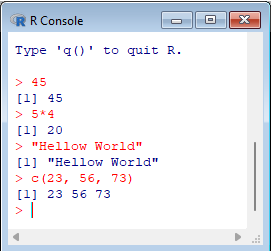 |
|---|
The R language works like a command line console. To print a string, simply type the string, also in quotes. It's an interpreted language, so it doesn't have to be compiled, nor is there an executable file generated; the R program itself reads the instructions and executes them.
The last instruction above builds a vector of elements, which is returned.
Action: | Expected: |
> # assigning values to variables | 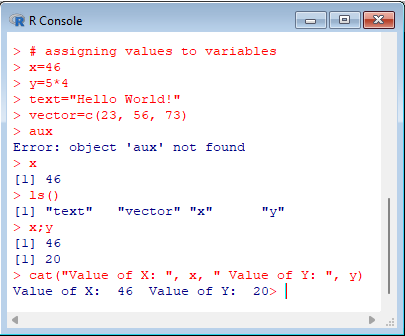 |
|---|
Comments in R start with # and continue to the end of the line. Notice the attempt to declare the aux variable, without the assignment. It doesn't make sense in R. Also note that the type of the variables is not specified. The ls() function lists all the objects that are defined. In this case it's only the x, y, text and vector objects, since the aux object hasn't been created.
The rm(<object>) function allows you to remove an object. When you exit the application, using q(), you can save the working environment so that you can continue later. The penultimate command is actually two commands on a single line. To separate two commands on one line, use a semicolon. In this case, the values of the variables x and y have been requested.
To get a result more similar to printf in C language, you can use the cat function, which must intersperse strings with variables.
You can redirect R's input and output with functions source(<file with commands>) and sink(<file with output>), but it's just as easy to insert the commands in a text file and simply copy/paste them into R so that the commands are executed.
The files are read/written from the directory in which R is run from.
Action: | Expected: |
> year <- 1345
> if(year%%4==0 && year%%100!=0 || year%%400==0) "Leap" else "Common" | 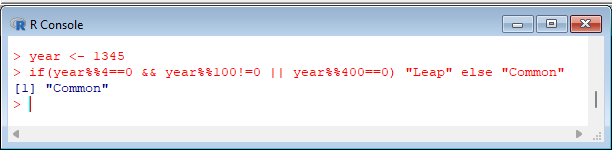 |
|---|
Conditionals can be used in much the same way as in C. The division remainder operator is %%, and the integer division is %/%. The logical operators in C and R are the same.
In the R language, it doesn't make sense to know the size of variables, as it is a loosely typed language. In this type of language, the memory occupied by a variable or data structure should not be the programmer's concern. However, there are basic variable modes in R: numeric; complex; logical; character. To obtain the basic mode of a variable, use the mode(<object>) function.
Action: | Expected: |
> sum=0; i=1
> while(i<=4) { sum=sum+i*i; i=i+1 }
> sum | 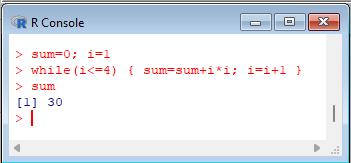 |
|---|
Action: | Expected: |
> Leap <- function(year) year%%4==0 && year%%100!=0 || year%%400==0
> Leap(2344) | 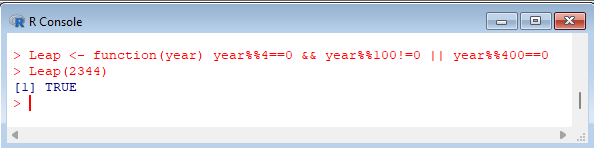 |
|---|
The definition of a function in R also consists of assigning an expression like:
function(<arguments>) expression
The expression can have a block of instructions, so that it can contain more than one command.
Once a function has been defined, it can be used inside other expressions.
Action: | Expected: |
> sum<-0
> for(i in 1:4) sum <- sum+i*i
> sum | 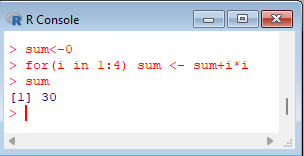 |
|---|
Action: | Expected: |
> 1:4
> c(1,2,3,4) | 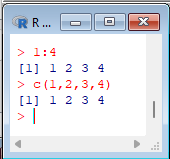 |
|---|
In R, there is also the repeat loop followed by an expression, which has no exit condition. The output of the cycle must use the "break" instruction, which exists in R with the same meaning as in C, and the "next" instruction is equivalent to "continue" in C. Usually, it is not advisable to use this type of instruction in either C or R, so the cycles to use should be the for and while loops.
Action: | Expected: |
> vector <- c(12, 45, 66, c(23, 455, 6)) > vector > sum(vector) > mean(vector) | 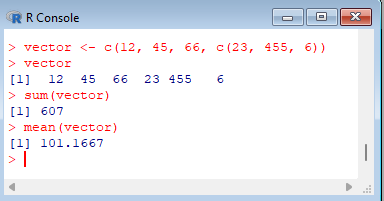 |
|---|
Action: | Expected: |
> vector[1] > vector[vector>25] > vector[vector>25] <- 0 > vector | 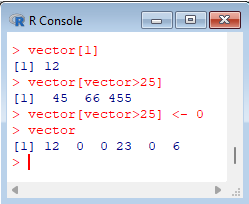 |
|---|
Action: | Expected: |
> matrix <- array(0, dim=c(10,10)) > matrix > matrix[,1] > matrix[1,] | 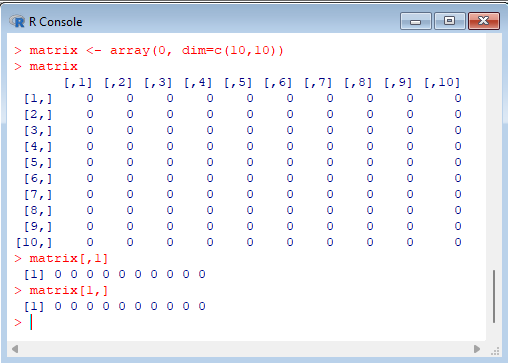 |
|---|
The array visualization shows the column and row headings, and also reveals a simple notation for extracting part of the array. The index [,1] returns a vector with the first column of the array, while the index [1,] returns a vector with the first row of the array.